


R
very happy
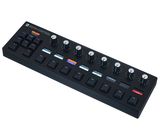
I use Ableton for over 8 years now, and I’ve had this controller for three weeks. The most important part is that it feels like hardware and stepping the knobs helps me to compare slight changes, without loosing reference and staring at the screen.
Assignment:
The assignment is simple, but can get a tiny bit straining after the 10th plugin you assign. Yet once you’ve assigned the plugin, it works on all instances you load up. You should plan some time for this (I’ve currently spent nearly 2 days updating my workflow).
Haptics:
you have three options:
- a subtle indent at 12 o’clock / you can also add indents at preferred spots
- choose 2–24 steps (yet only up to 16 can be labeled; after that all labels vanish, unfortunately)
- continuously smooth
The key layout and menu navigation is well desinged, It uses a typical WASD finger positioning.
Resolution:
The pots can make very fine adjustments in the 0.01 dB range depending on the settings and the controlled plugin of course - tried via the USB connection.
MIDI capabilities:
works as expected, and I'm using the MIDI I/O to control my Synth. I had a issue which is not necessary the fault of the roto, as the synth receives MSB/LSB CC Messages, but the roto apparently gets confused when receiving these kind of data (knobs jump to wrong positions), so I had to clean up the incoming messages through my midi interface.
Negatives:
If you’ve once made an assignment to a plugin, it will always appear to the Roto in this setting. This also has a downside. for example, using an EQ in different ways (broad shaping, precise cuts, only mid or side channel cleanups). This becomes a workaround where you have to put the EQ into an Ableton Rack, by which you are consequently limited to 16 macros.
Another minor problem is bunching a lot of plugins into a single macro rack in Ableton. The Roto Control plugin selection menu now becomes crowded and makes it hard to navigate your plugins. It would be nice to have a collapse/expand option here.
Also, in Plugin Mode, it would be nice if you could expand track groups by accessing the “Func” setting; this is currently only possible through “Mix” Mode.
In General:
I highly recommend this controller. It has improved my approach to music production, which is amazing - and worth the money in my opinion.
PS: Also check out the M4L ShortcutBuddy in combination with this controller it really sped up my workflow
Assignment:
The assignment is simple, but can get a tiny bit straining after the 10th plugin you assign. Yet once you’ve assigned the plugin, it works on all instances you load up. You should plan some time for this (I’ve currently spent nearly 2 days updating my workflow).
Haptics:
you have three options:
- a subtle indent at 12 o’clock / you can also add indents at preferred spots
- choose 2–24 steps (yet only up to 16 can be labeled; after that all labels vanish, unfortunately)
- continuously smooth
The key layout and menu navigation is well desinged, It uses a typical WASD finger positioning.
Resolution:
The pots can make very fine adjustments in the 0.01 dB range depending on the settings and the controlled plugin of course - tried via the USB connection.
MIDI capabilities:
works as expected, and I'm using the MIDI I/O to control my Synth. I had a issue which is not necessary the fault of the roto, as the synth receives MSB/LSB CC Messages, but the roto apparently gets confused when receiving these kind of data (knobs jump to wrong positions), so I had to clean up the incoming messages through my midi interface.
Negatives:
If you’ve once made an assignment to a plugin, it will always appear to the Roto in this setting. This also has a downside. for example, using an EQ in different ways (broad shaping, precise cuts, only mid or side channel cleanups). This becomes a workaround where you have to put the EQ into an Ableton Rack, by which you are consequently limited to 16 macros.
Another minor problem is bunching a lot of plugins into a single macro rack in Ableton. The Roto Control plugin selection menu now becomes crowded and makes it hard to navigate your plugins. It would be nice to have a collapse/expand option here.
Also, in Plugin Mode, it would be nice if you could expand track groups by accessing the “Func” setting; this is currently only possible through “Mix” Mode.
In General:
I highly recommend this controller. It has improved my approach to music production, which is amazing - and worth the money in my opinion.
PS: Also check out the M4L ShortcutBuddy in combination with this controller it really sped up my workflow
2
0
Bewertung melden
n
Spitzenmäßiger Controller!
Super Controller.
Fühlt sich alles sehr stimmig an.
Dass man durch die Motorregler immer das sieht, was auf dem Plugin gerade eingestellt ist, ist schon sehr cool und vermittelt das Gefühl von Hardware.
Ich gucke kaum noch auf den Monitor.
Ich kann ihn nur empfehlen.
Fühlt sich alles sehr stimmig an.
Dass man durch die Motorregler immer das sieht, was auf dem Plugin gerade eingestellt ist, ist schon sehr cool und vermittelt das Gefühl von Hardware.
Ich gucke kaum noch auf den Monitor.
Ich kann ihn nur empfehlen.
24
0
Bewertung melden
lm
State of the Art MIDI Controller
Genau das was ich mir von einem Controller wünsche. Funktioniert tadellos, extrem leise und schnelle Motor Potis. Tolle Software (läuft auch unter linux!), sehr detaillierte Einstellungen möglich (z.B. alle Potis auch als 14bit MIDI CC möglich - wohlgemerkt MIDI 1.0!), dadurch extrem smoothe Einstellmöglichkeiten.
Absolutes Alleinstellungsmerkmal (meiner Kenntnis nach gibt es nicht einen vergleichbaren Controller) sind die genialen Motor Potis. Mir ist nicht ansatzweise klar, wie die klassischen Synth Platzhirsche Geräte für mehrere Tausend Euros verkaufen können, OHNE Motor Potis einzubauen. Es ist ein absoluter Game Changer nach einem Preset Wechsel automatisch alle tatsächlichen Parameter Werte an den Potis direkt zu sehen. Das Problem ist bei Moog, Roland, Sequential ... ja bekannt: Sie lavieren sich mit "JUMP" oder "CATCH" Optionen durch, statt einer solche Company wie Melbourne Instruments die Sachen aus den Händen zu reißen.
In jedem Falle klare Kaufempfehlung. Der Preis ist kein Schnäppchen, aber angesichts der State of the Art Technik mehr als angemessen.
Absolutes Alleinstellungsmerkmal (meiner Kenntnis nach gibt es nicht einen vergleichbaren Controller) sind die genialen Motor Potis. Mir ist nicht ansatzweise klar, wie die klassischen Synth Platzhirsche Geräte für mehrere Tausend Euros verkaufen können, OHNE Motor Potis einzubauen. Es ist ein absoluter Game Changer nach einem Preset Wechsel automatisch alle tatsächlichen Parameter Werte an den Potis direkt zu sehen. Das Problem ist bei Moog, Roland, Sequential ... ja bekannt: Sie lavieren sich mit "JUMP" oder "CATCH" Optionen durch, statt einer solche Company wie Melbourne Instruments die Sachen aus den Händen zu reißen.
In jedem Falle klare Kaufempfehlung. Der Preis ist kein Schnäppchen, aber angesichts der State of the Art Technik mehr als angemessen.
6
0
Bewertung melden
T
Endlich ein Controller der die Maus ersetzt
Diesen Controller nutze ich in meiner Band an den Drums um Logic Pro im Studio zu regeln. Sprich: Aufnahme, Volume Levels, Sends, Marker-Sprünge. Letzteres angelernt, das vorherige alles 'Out-Of-The-Box'. Es macht einfach richtig Spaß den Controller zu nutzen, da die Regler einfach traumhaft leise, genau, leichtgängig und zuverlässig laufen. Richtig schön wären einige weitere Parameteranzeigen, aber vielleicht kommt das ja noch in einer zukünftigen Software.
1
0
Bewertung melden
M
Super Teil ! absolut Top Umsetzung der motorisierten Regler
Super Teil ! absolut Top Umsetzung der motorisierten Regler über magnetischen Antrieb.
Einziger Nachteil, nur 8 Regler, ich hätte gerne mehr.
Einziger Nachteil, nur 8 Regler, ich hätte gerne mehr.
0
0
Bewertung melden
t
Der Roto-Control macht, dass ich bei Ableton Live bleibe.
Ein Gimmick, dachte ich: Diese Motordrehknöpfe. Aber irgendwie dann doch so nett, dass der Roto Control auf meiner Liste für einen Controller blieb. Ich habe ihn zunächst wegen des geringen Platzbedarfs gekauft: Er passte genau vor mein Pult.
Inzwischen sind wir Freunde geworden: Die typischen Aufgaben eines DAW-Controllers erledigt der Roto Control sehr gut: Transportfunktionen, Spuren scharf schalten, Ausspielwege regeln - aber das können andere auch.
Richtig spannend wird es, wenn man den Roto Control zur Steuerung von Plugins verwendet. Die Drehregler lassen sich rasten, man kann ein Mittenraster einstellen und das Ganze fühlt sich haptisch gut an. Nun bin ich selbst eher kein Plugin-Fan, aber für meine Essentials wie etwa Fabfilter nutze ich den Roto Control inzwischen intuitiv.
Am Ende war das schnell erworbene Muskelgedächtnis dann auch der Grund, nicht die DAW zu wechseln. Der Roto Control unterstützt derzeit Ableton Live (und meines Wissens inzwischen auch Logic) - aber das war es dann auch.
Wichtig: Man muss die Funktionen jedes Plugins auf die Drehknöpfe und Tasten des Roto Control manuell mappen. Das hört sich erst einmal umständlich an, ist aber in der Praxis schnell getan und die entsprechenden Einstellungen werden auch im Gerät selbst gespeichert.
(Die fünf Sterne für den Sound sind natürlich ein Witz - das Gerät hat keinen Sound. Aber da es ein toller Controller ist, wollte ich auch die insgesamt gute Bewertung nicht verwässern)
Inzwischen sind wir Freunde geworden: Die typischen Aufgaben eines DAW-Controllers erledigt der Roto Control sehr gut: Transportfunktionen, Spuren scharf schalten, Ausspielwege regeln - aber das können andere auch.
Richtig spannend wird es, wenn man den Roto Control zur Steuerung von Plugins verwendet. Die Drehregler lassen sich rasten, man kann ein Mittenraster einstellen und das Ganze fühlt sich haptisch gut an. Nun bin ich selbst eher kein Plugin-Fan, aber für meine Essentials wie etwa Fabfilter nutze ich den Roto Control inzwischen intuitiv.
Am Ende war das schnell erworbene Muskelgedächtnis dann auch der Grund, nicht die DAW zu wechseln. Der Roto Control unterstützt derzeit Ableton Live (und meines Wissens inzwischen auch Logic) - aber das war es dann auch.
Wichtig: Man muss die Funktionen jedes Plugins auf die Drehknöpfe und Tasten des Roto Control manuell mappen. Das hört sich erst einmal umständlich an, ist aber in der Praxis schnell getan und die entsprechenden Einstellungen werden auch im Gerät selbst gespeichert.
(Die fünf Sterne für den Sound sind natürlich ein Witz - das Gerät hat keinen Sound. Aber da es ein toller Controller ist, wollte ich auch die insgesamt gute Bewertung nicht verwässern)
0
0
Bewertung melden
S
Top Midi Controller
Das Ding macht echt Freude, schnell und easy konfiguriert um Makros in Ableton zu steuern und gute Build Quality. Kann es nur empfehlen.
0
0
Bewertung melden