


J
A leap into handheld recording technology
This is a review coming from a person that is in music since 5 years old but didn't deal with professional sound technology until recently.
So I bought this recorder after exhausting research bec Im a pianist and piano is a tough instrument to record. Having seen almost all recorders on the market and I can say confidently that I have not regreted it at all.
Pros:
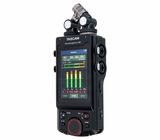
-The display is mesmerizing , it looks super cool and it makes it super easy to use, especially on the go or under time pressure (I understood it in minutes without having touched any other recorder, depends on the kind of use).
-Amazing features, makes it a powerful and fast multi-tool
-The on board mics have suprising good and detailed quality compared to all previous handheld recorders
-Along with super clean preams, you get something veeeeeery decent out of it, on a fazioli piano it sounded crystal clean. It can support social media content with ease. Of course with post edit you unlock even more potential
-32 bit float is a must for live music recitals, you have your head relaxed for clipping
-Rec and peak red light are essential
-Split recording tool / metronome / tuner / dual recording and others super useful for musicians
-Battery is not as bad as I heard/expected, it's quite reliable. Although i strongly recommend rechargeable batteries
Cons:
-Very sensitive, it definetely needs a case and at this price range is a bummer that a case doesn't come along. I still carry it in the box because in order to protect that huge touch screen you need a specified case.
-Bluetooth adapter is a must and it's embarassing that it isn't sold along. The Tascam app doesn't work with USB cable with smartphone, it needs the app. If you try to record through your smartphone you might get a glitch sound every 2 minutes which makes the recording unuseable (not in all phones though). If you do social media you want it to be recording along with your phone, so it's quite furstrating that you have to pay extra 30 bucks and im not sure if even then you would do that.
-The back button truly doens't exist, you have to long press home button for 2 seconds. Its not the end of the world, but is slightly annoying at times, i would prefer it to be instant.
Pros over X6:
-Once you get the X8 you understand that the screen is as big as it has to be easygoing and fast. I haven't had a X6 but i imagine it wouldn't be as easy to use, especially in tough times.
-Mics come out, so if they break they can be replaced.
-XLRs are a tremendous potential (or not, depending on what you plan your use on). But consider that with XLRs you might be able to rent it at musicians and after some time have some money earned. Although I dont totally recommend it bc as I said it's very sensitive and requires careful attention
-X6 doens't have combo jack recording. My first plan was to record line in and onboard mics together but that was not possible on the X6 and i didn't want to have to use two huge cables for a digital piano
So this was my experience with Tascam Portacapture X8, minding that I've been using it for less than a month. I will update the review if i figure out something else.
But I'll tell you this. You don't simply buy a recorder, you invest in a recording buddy to assist you in your work and in your on-spot creative ideas. So choose wisely and if you are like me and like wonderful projects out of nowhere or that might happen in the middle of nowhere, this is an investment in your art and work.
So I bought this recorder after exhausting research bec Im a pianist and piano is a tough instrument to record. Having seen almost all recorders on the market and I can say confidently that I have not regreted it at all.
Pros:
-The display is mesmerizing , it looks super cool and it makes it super easy to use, especially on the go or under time pressure (I understood it in minutes without having touched any other recorder, depends on the kind of use).
-Amazing features, makes it a powerful and fast multi-tool
-The on board mics have suprising good and detailed quality compared to all previous handheld recorders
-Along with super clean preams, you get something veeeeeery decent out of it, on a fazioli piano it sounded crystal clean. It can support social media content with ease. Of course with post edit you unlock even more potential
-32 bit float is a must for live music recitals, you have your head relaxed for clipping
-Rec and peak red light are essential
-Split recording tool / metronome / tuner / dual recording and others super useful for musicians
-Battery is not as bad as I heard/expected, it's quite reliable. Although i strongly recommend rechargeable batteries
Cons:
-Very sensitive, it definetely needs a case and at this price range is a bummer that a case doesn't come along. I still carry it in the box because in order to protect that huge touch screen you need a specified case.
-Bluetooth adapter is a must and it's embarassing that it isn't sold along. The Tascam app doesn't work with USB cable with smartphone, it needs the app. If you try to record through your smartphone you might get a glitch sound every 2 minutes which makes the recording unuseable (not in all phones though). If you do social media you want it to be recording along with your phone, so it's quite furstrating that you have to pay extra 30 bucks and im not sure if even then you would do that.
-The back button truly doens't exist, you have to long press home button for 2 seconds. Its not the end of the world, but is slightly annoying at times, i would prefer it to be instant.
Pros over X6:
-Once you get the X8 you understand that the screen is as big as it has to be easygoing and fast. I haven't had a X6 but i imagine it wouldn't be as easy to use, especially in tough times.
-Mics come out, so if they break they can be replaced.
-XLRs are a tremendous potential (or not, depending on what you plan your use on). But consider that with XLRs you might be able to rent it at musicians and after some time have some money earned. Although I dont totally recommend it bc as I said it's very sensitive and requires careful attention
-X6 doens't have combo jack recording. My first plan was to record line in and onboard mics together but that was not possible on the X6 and i didn't want to have to use two huge cables for a digital piano
So this was my experience with Tascam Portacapture X8, minding that I've been using it for less than a month. I will update the review if i figure out something else.
But I'll tell you this. You don't simply buy a recorder, you invest in a recording buddy to assist you in your work and in your on-spot creative ideas. So choose wisely and if you are like me and like wonderful projects out of nowhere or that might happen in the middle of nowhere, this is an investment in your art and work.
1
0
Report
p
A High-Res Powerhouse
The Tascam Portacapture X8 is a formidable contender in the world of handheld recorders. After putting it through its paces, here is a breakdown of my experience:
Display and Interface
The 3.5-inch color touchscreen is arguably the best in its class. The colors are vibrant, and the touch response is snappy, making the intuitive user interface (UI) a breeze to use, just like using a smartphone.
Build and Ergonomics
Mics: The included detachable diaphragm condenser mics provide impressive clarity and a wide soundstage.
Button Layout: The physical buttons are thoughtfully placed, allowing for quick tactile control even when you aren't looking at the screen.
Connectivity: The USB-C connection is a welcome modern standard, handling both high-speed data transfer and reliable power from a computer or power bank.
Smart Recording Features
The Auto-Record functionality is a lifesaver for field recording:
- It maintains a permanent 2-second pre-record buffer, so you never miss the start of a sound.
- The threshold settings are precise, allowing the device to trigger only when the audio reaches your desired level.
With its high track count, you have plenty of channels to manage complex multi-mic setups.
DAW Integration & Audio Interface Mode
As a USB audio interface, the X8 is powerful but has a slight learning curve. I was able to successfully record multichannel audio into Reaper. However, I did encounter some friction trying to achieve simultaneous DAW playback while recording.
File Management and Metadata
One quirk to note: the recorded files do not use a standard timestamp in the filename, relying instead on a sequence.
Linux Users: This is an easy fix! You can quickly rename or organize files using a simple bash script to pull from system attributes.
Metadata: If you need to verify the original recording time, opening the files in BWF MetaEdit reveals the true file creation timestamp and the device name perfectly.
Summary: Despite some minor routing hurdles in certain DAWs, the Portacapture X8 is a professional-grade tool with a stunning interface and rock-solid recording features. Highly recommended for field recordists and podcasters alike.
Display and Interface
The 3.5-inch color touchscreen is arguably the best in its class. The colors are vibrant, and the touch response is snappy, making the intuitive user interface (UI) a breeze to use, just like using a smartphone.
Build and Ergonomics
Mics: The included detachable diaphragm condenser mics provide impressive clarity and a wide soundstage.
Button Layout: The physical buttons are thoughtfully placed, allowing for quick tactile control even when you aren't looking at the screen.
Connectivity: The USB-C connection is a welcome modern standard, handling both high-speed data transfer and reliable power from a computer or power bank.
Smart Recording Features
The Auto-Record functionality is a lifesaver for field recording:
- It maintains a permanent 2-second pre-record buffer, so you never miss the start of a sound.
- The threshold settings are precise, allowing the device to trigger only when the audio reaches your desired level.
With its high track count, you have plenty of channels to manage complex multi-mic setups.
DAW Integration & Audio Interface Mode
As a USB audio interface, the X8 is powerful but has a slight learning curve. I was able to successfully record multichannel audio into Reaper. However, I did encounter some friction trying to achieve simultaneous DAW playback while recording.
File Management and Metadata
One quirk to note: the recorded files do not use a standard timestamp in the filename, relying instead on a sequence.
Linux Users: This is an easy fix! You can quickly rename or organize files using a simple bash script to pull from system attributes.
Metadata: If you need to verify the original recording time, opening the files in BWF MetaEdit reveals the true file creation timestamp and the device name perfectly.
Summary: Despite some minor routing hurdles in certain DAWs, the Portacapture X8 is a professional-grade tool with a stunning interface and rock-solid recording features. Highly recommended for field recordists and podcasters alike.
0
0
Report
M
Brilliant. Like having two extra ears.
Extraordinary. Especially when set to the highest resolutions.
Listening back to recorded sound, its like it's all happening again.
Listening back to recorded sound, its like it's all happening again.
2
2
Report
U
Tango festivals
I use the Tascam Portacapture X8 to record orchestras in Tango festivals. I like the Bluetooth connection because I can be away and still control and check the settings.
1
0
Report
Y
Fantastic workhorse Recorder with great features
The X-8 is my go to recorder for most applications and with 32 bit recording and bluetooth control via an app you cannot go wrong. The latest software update with the POCKETSTUDIO is also really useful!
1
0
Report
S
Worth to buy.
I bought it about 6 months ago and never regretted it. It's a bit heavy, but considering that manufacturing quality is good i can't complain about that "flaw". Absolutely worth buying.
2
1
Report